Pomodoro Technique for Students — Complete 2025 Guide
The Pomodoro Technique has helped millions of students transform their study habits. This
comprehensive guide covers everything from the classic 25/5 method to advanced variations like 52/17, with
specific strategies for ADHD, remote learning, and different types of academic work.
The Pomodoro Technique is a time management method invented by Francesco Cirillo in the late 1980s
while he was a university student struggling with focus. The name comes from the tomato-shaped kitchen timer
("pomodoro" is Italian for "tomato") he used to track his work sessions.
The Core Method
The classic Pomodoro Technique follows these steps:
Choose a task — Pick something you need to focus on
Set timer for 25 minutes — This is one "Pomodoro"
Work until the timer rings — No interruptions, no multitasking
Take a 5-minute break — Step away from work completely
Repeat — After four Pomodoros, take a 15-30 minute break
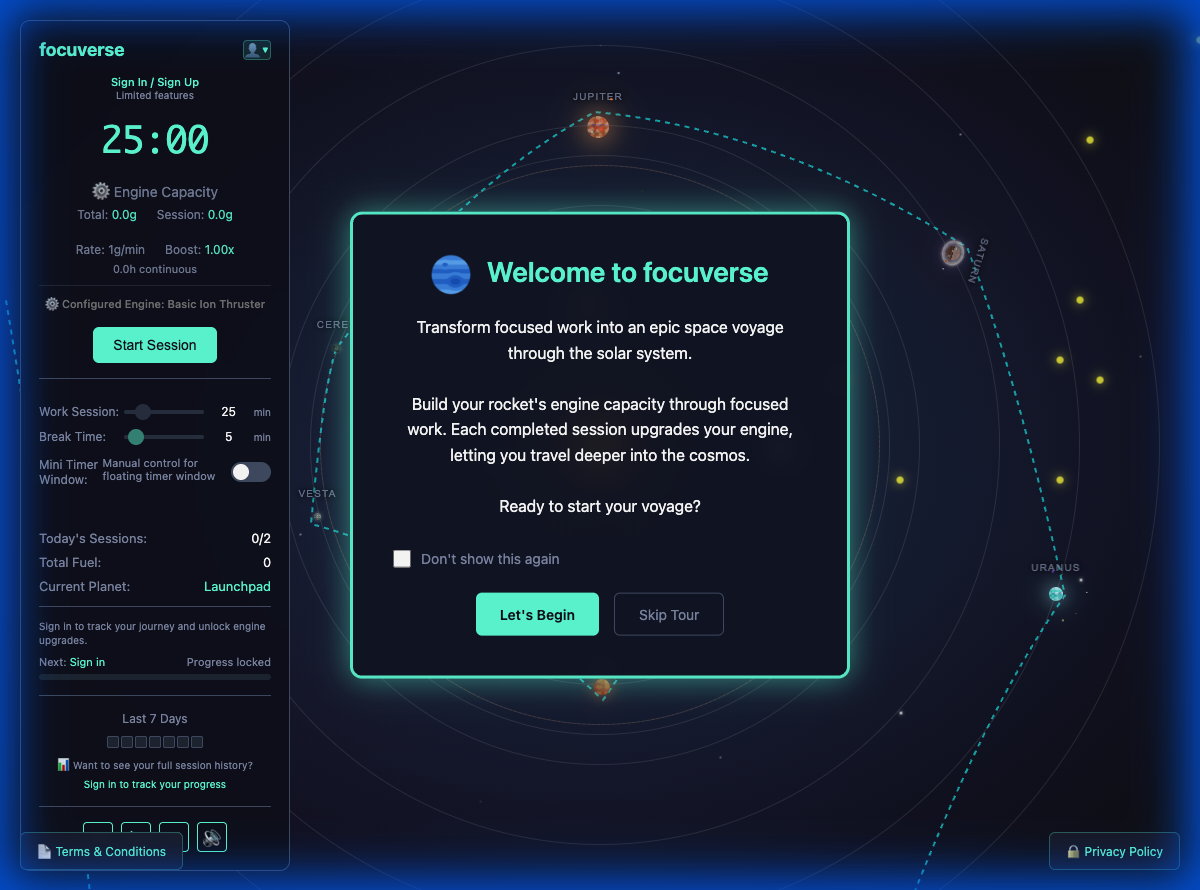
Modern Pomodoro timers like focuverse extend this concept with gamification, visual habit tracking, and
cross-device synchronization—but the core philosophy remains unchanged: focused work in short bursts,
punctuated by deliberate rest.
focuverse's Pomodoro timer with cosmic gamification makes focus sessions engaging
"The Pomodoro Technique transforms time from an enemy into an ally." — Francesco Cirillo, The
Pomodoro Technique (book)
2. The Science Behind Pomodoro
The Pomodoro Technique isn't just a productivity hack—it's grounded in cognitive science research about how our
brains focus and recover.
🧠 Attention Restoration Theory
Research published in Cognition journal shows that brief diversions from a task dramatically improve focus.
The 5-minute Pomodoro break serves this exact function—it allows your brain's attention networks to reset.
⏱️ The 25-Minute Window
Studies on sustained attention show that most people experience significant focus decline after 20-25
minutes. The Pomodoro's 25-minute interval was intuitively calibrated to match this natural rhythm.
💪 Deliberate Practice Effects
Research by Anders Ericsson on expertise shows that focused practice is more effective in shorter bursts.
Marathon study sessions often yield diminishing returns; structured intervals maximize learning per hour.
🎯 Goal Gradient Effect
Psychological research shows we work harder as we approach a goal. With only 25 minutes on the clock,
you're always "close" to the break—which keeps motivation high throughout the session.
3. Why Students Should Use Pomodoro
📚 ADHD-Friendly Structure
Short work periods paired with clear break signals reduce decision fatigue. The timer removes the burden of
"how long should I study?" Gamified timers like focuverse add cosmic cues and rocket fuel to celebrate each
sprint—providing the dopamine hits ADHD brains need.
📝 Exam Prep Balance
Alternate problem sets with reading or flashcards to avoid monotony. Use different Pomodoros for different
subjects. This interleaved practice is proven to improve long-term retention.
💻 Remote Learning Rhythm
When classes go hybrid, a browser-based timer keeps your day anchored. No need to install apps on school
devices—just open focuverse and start a session, regardless of device or campus wifi restrictions.
📊 Visual Progress Tracking
Seeing your completed sessions adds up creates motivation. focuverse's GitHub-style heatmap shows your
consistency over weeks and months—turning study habits into visible achievements.
The traditional 25/5 Pomodoro isn't the only option. Different tasks and personalities may benefit from
alternative timing patterns:
Method
Work
Break
Best For
Origin
Classic Pomodoro
25 min
5 min
Most tasks, beginners
Francesco Cirillo (1980s)
52/17 Rule
52 min
17 min
Deep work, coding, writing
DeskTime productivity research
50/10 Rule
50 min
10 min
Engineering, math problems
University lecture timing
90-minute blocks
90 min
20-30 min
Creative work, research
Ultradian rhythm research
How to Choose Your Timing
Start with 25/5 if you're new to Pomodoro. It's forgiving and easy to sustain.
Try 50/10 or 52/17 if 25 minutes feels too short for your tasks, especially for programming
or lab work.
Use 90-minute blocks for creative writing or deep research where context-switching is
costly.
Adjust based on energy — you might do 25/5 in the morning and 50/10 after lunch.
focuverse Premium allows you to customize your session durations to match whatever timing pattern works best
for you.
5. Applying Pomodoro to Different Study Tasks
📖 Reading Dense Textbooks
Use the default 25-minute work block to read one chapter or section. Don't try to cover too much—comprehension
matters more than pages. During your 5-minute break, summarize the key points verbally or write 2-3 bullet
points. This active recall enhances retention.
Recommended timing: 25/5 (standard) or 30/5 for complex material.
🔢 Problem Sets and Labs
Math and science problems often require longer focus to build momentum. Switch to 50/10 or 52/17 cycles for
problem-heavy work. If you get stuck on a problem, note it and move on—you can return during the next session.
Recommended timing: 50/10 for problem sets, 25/5 for labs with equipment transitions.
✍️ Essay Writing
Stack multiple Pomodoros with specific goals:
Pomodoro 1: Outline and thesis development
Pomodoro 2-3: First draft writing (no editing!)
Pomodoro 4: Revision and citations
Separating writing from editing prevents the "perfect first sentence" trap that stops many students.
🎧 Language Learning
Pomodoro works excellently for language study. Use 25-minute blocks for:
Vocabulary flashcards (Anki, Quizlet)
Grammar exercises
Reading practice in target language
Speaking/shadowing practice
Rotate between different skills across Pomodoros to create balanced practice.
💻 Programming and Projects
Coding often requires "getting into flow," so longer sessions work better. Try 52/17 and use breaks to
physically move—sitting for hours creates fatigue even when mentally engaged.
Pro tip: Students often forget to log breaks. Keep your timer running even when
you stand up so the fuel ledger stays accurate. focuverse tracks both work and rest time.
6. Pomodoro Adaptations for ADHD
If you have ADHD, the Pomodoro Technique can be transformative—but you may need some adjustments:
⏰ Shorter Sessions
If 25 minutes feels too long initially, start with 15-minute Pomodoros and work up. Success at a
sustainable level beats failure at an ambitious one.
🎮 Gamified Rewards
ADHD brains need more frequent dopamine hits. Use focuverse's cosmic journey gamification—watching rocket
fuel accumulate provides immediate visible progress that sustains motivation.
📊 Visual Tracking
The GitHub-style heatmap makes consistency visible. For ADHD students, seeing patterns helps build habits
that don't rely on willpower alone.
🎵 Background Stimulation
Many ADHD students focus better with background audio. focuverse includes built-in lo-fi music, so you
don't need to manage multiple apps or tabs.
ADHD-Specific Tips
Use a physical timer component — The visual countdown helps externalize time perception
Set up the next session before your break — Decision fatigue is higher for ADHD; reduce
choices
Pair with body doubling — Work alongside others (even virtually) for accountability
Embrace imperfect starts — Starting is the hardest part; commit to just one Pomodoro first
7. Best Browser-Based Pomodoro Tools
For students, browser-based timers offer key advantages: they work on school Chromebooks, require no
installation, and can't be blocked by IT policies. Here are the top options:
🚀 focuverse
Cosmic journey gamification, GitHub-style heatmap, built-in lo-fi music, and unlimited free sessions. The
dark interface is optimized for late-night study. Cross-device sync keeps progress unified.
Best for: Students wanting gamification + habit tracking
📍 Pomofocus
Clean, minimal interface with task lists. Good for users who want zero distractions, but lacks visual habit
tracking or advanced analytics.
Best for: Minimalists who just want a timer
🌳 Forest Web
Browser extension version of the popular Forest app. More limited than the mobile app, but provides basic
tree-planting gamification on desktop.
Best for: Existing Forest users who also work on desktop
Key consideration: The best Pomodoro tool is the one you can launch instantly. Browser-based
timers keep you honest on school-managed Chromebooks where you can't install apps.
After four Pomodoros, you MUST take a 15-30 minute break. This isn't optional—it's when your brain
consolidates learning. Skipping leads to diminishing returns.
❌ Working During Breaks
Checking email or social media during breaks isn't rest—it's just different work. Stand up, stretch, get
water. True rest restores focus capacity.
❌ Rigid Timing
If 25/5 feels wrong, adjust. Ignoring energy levels leads to burnout. Try 52/17 or 50/10 when 25 minutes
feels too short for your current task.
❌ Poor Task Sizing
"Work on thesis" is too vague. "Write 300 words of Chapter 3" fits a Pomodoro. Break large tasks into
session-sized pieces.
❌ No Progress Tracking
Without tracking, you lose motivation over time. Use focuverse's heatmap to visualize consistency—seeing
patterns builds habits.
❌ Treating Every Day the Same
Your capacity varies. Some days you'll complete 12 Pomodoros; others, 4. Both can be productive if you
focus during sessions.
9. Frequently Asked Questions
What is the Pomodoro Technique?
The Pomodoro Technique is a time management method invented by Francesco Cirillo in the late 1980s.
It breaks work into 25-minute focused intervals (called "pomodoros") followed by 5-minute breaks. After four
pomodoros, you take a longer 15-30 minute break. The name comes from the tomato-shaped kitchen timer ("pomodoro"
= Italian for "tomato") that Cirillo used as a university student.
Is the Pomodoro technique good for students with ADHD?
Yes, the Pomodoro technique is particularly effective for students with ADHD. The structured 25-minute
intervals prevent hyperfocus burnout, while the regular breaks provide natural stopping points. Gamified timers
like focuverse add visual feedback (rocket fuel, progress tracking) that helps ADHD brains stay engaged through
dopamine rewards.
How many Pomodoros should I do per day?
Most students can sustain 8-12 Pomodoro sessions per day of effective focused work. This
equals 3-5 hours of deep work, which research shows is about the maximum for most people. Start with 4-6
sessions and gradually increase. Quality matters more than quantity—6 focused Pomodoros beat 12 distracted ones.
Can I make sessions longer than 25 minutes?
Absolutely. While 25 minutes is the traditional Pomodoro length, many people use variations like
50/10 (50 minutes work, 10 minutes break) or 52/17 (based on DeskTime research
showing top performers work in 52-minute bursts). The key is finding a rhythm that matches your task type and
attention span. focuverse Premium allows custom session durations.
What's the best Pomodoro timer for students?
For students, a browser-based Pomodoro timer like focuverse is ideal because it works on
school Chromebooks without app installation, includes visual gamification for motivation, offers a GitHub-style
heatmap for habit tracking, and is completely free. Mobile alternatives like Forest ($3.99 iOS) and Flora are
good but require app downloads.
Why is it called the Pomodoro Technique?
Francesco Cirillo named it after the tomato-shaped kitchen timer he used as a university student in Italy.
"Pomodoro" is Italian for "tomato." He discovered that tracking 25-minute work intervals with this simple timer
dramatically improved his focus and productivity.
Can I use Pomodoro on my school Chromebook?
Yes! Browser-based Pomodoro timers like focuverse and Pomofocus work on school-issued
Chromebooks without requiring any installation or IT approval. They load directly in your browser tab—just go to
the website and start timing.
Ready to Master the Pomodoro Technique?
focuverse makes the Pomodoro Technique engaging with cosmic gamification, visual progress tracking, and
built-in lo-fi music—all completely free. Start your first 25-minute session now.